 Back to Blog
KVM and the classic OpenVZ container VPS both let several customers use one physical server. The dividing line is the operating system kernel: a classic OpenVZ container shares the host’s Linux kernel, while a KVM virtual machine boots its own. That changes what you can install, how you administer the server and where the security boundary sits.
EDIS Global once offered OpenVZ. Today our VPS range uses KVM exclusively. Here is the practical difference, including where the marketing shorthand needs a little care.
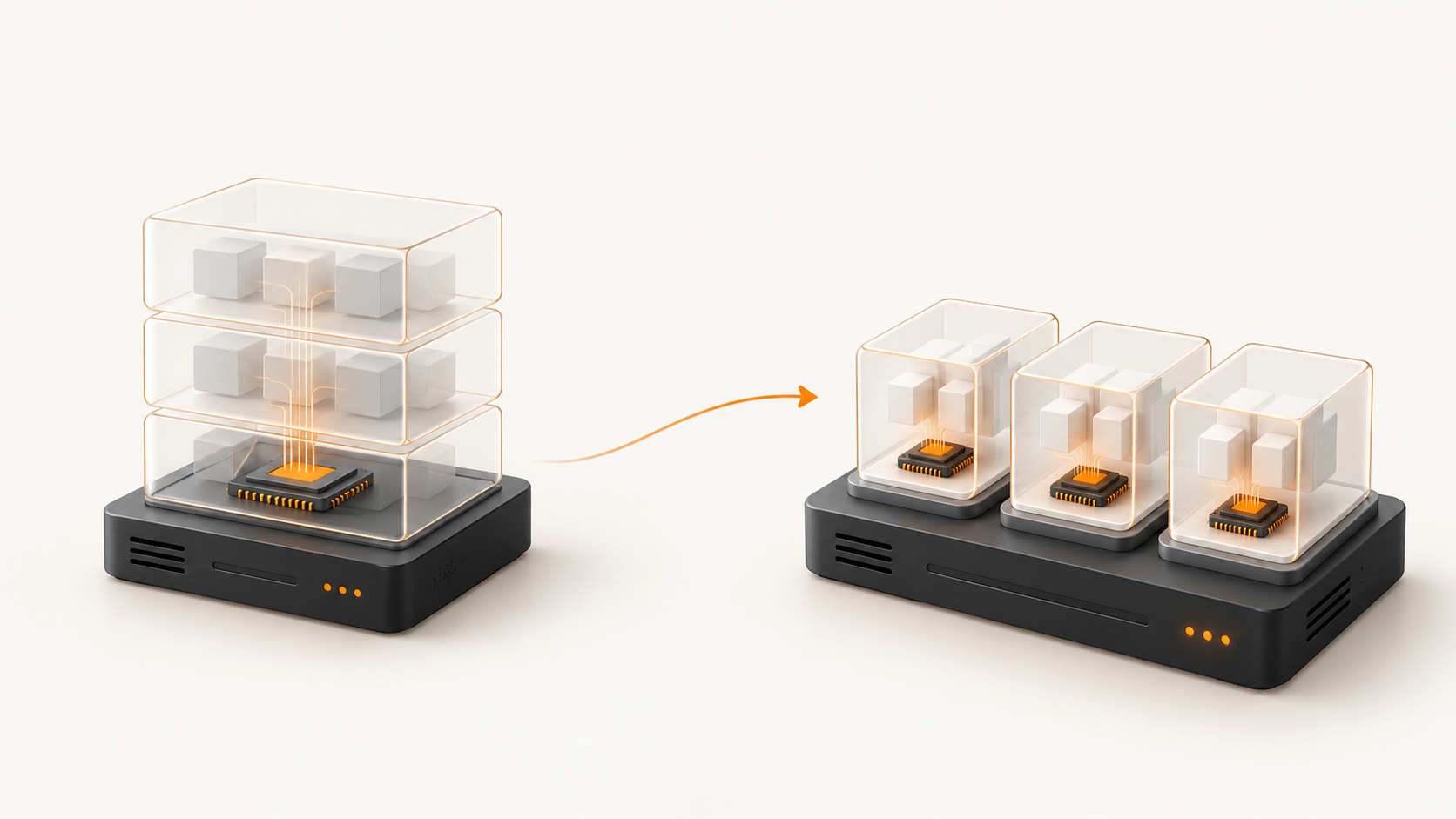
KVM vs OpenVZ at a glance
- Kernel: A classic OpenVZ container uses the host kernel; a KVM VM boots its own guest kernel.
- Resources: Both can have limits. The provider’s allocation policy, not the label alone, decides what is guaranteed. EDIS provisions dedicated vCPU allocations, guaranteed RAM and plan storage on KVM.
- Operating systems: Legacy OpenVZ containers run Linux user space compatible with the host kernel. KVM can run supported Linux or Windows guests and boot supported custom images.
- Isolation: Containers separate processes and files through kernel mechanisms but share that kernel. KVM places each guest behind a separate virtual hardware boundary.
What is the difference between a KVM VPS and an OpenVZ VPS?
A classic OpenVZ VPS is an operating-system container. Its applications are processes on the host, grouped into a separate view of files, networking and process IDs. It feels like a server to the customer, but there is no independent guest kernel. A KVM VPS is a full virtual machine: virtual CPU, memory and disk are presented to a guest operating system that starts and runs separately.
This article compares KVM with the older OpenVZ container products familiar to VPS buyers. The broader OpenVZ platform has also supported KVM-based virtual machines; the word OpenVZ on its own does not identify every product as a container.
Can I run my own kernel or load kernel modules?
With KVM, yes: the guest controls its own kernel. You can update it, select a supported alternative kernel and use kernel features or modules inside the guest, subject to the virtual hardware and your configuration. Root access is root inside your VM, not on the physical host.
In a classic OpenVZ container, all tenants depend on the host kernel. You cannot replace that kernel from inside your container or load arbitrary host kernel modules. That often made otherwise simple software requirements a support request.
Are CPU, RAM and disk resources dedicated?
KVM gives a VM its own assigned virtual CPUs, memory allocation and virtual disk. It does not, by itself, mean that each vCPU owns a whole physical core or that the entire physical server belongs to one customer. Physical processors, storage hardware and network uplinks remain shared infrastructure, so the plan and the provider’s provisioning policy matter.
OpenVZ also allowed CPU, memory and disk limits, but older container offerings commonly used different accounting and burst rules. At EDIS Global, each KVM plan has its specified vCPU allocation, guaranteed RAM and provisioned disk capacity. Compare the exact plan and location for the amount you need; performance and network throughput are not implied by the word KVM alone.
Which operating systems can I install?
A classic OpenVZ container uses Linux user space on the host’s Linux kernel. You can choose compatible Linux templates, but you cannot boot Windows as a container or choose an entirely independent operating system kernel.
KVM can boot supported Linux and Windows guest systems because each VM has virtual hardware and its own kernel. EDIS offers Linux images, Windows on suitable plans and custom ISO installation options. Check the available image, boot mode, drivers and licence for the exact plan; we recommend at least 4 GB RAM and 2 vCPU for Windows Server.
How does security isolation differ?
OpenVZ containers were not without isolation: the technology separates process lists, file-system views and other resources. The important limitation is that all containers share the host kernel. A vulnerability that lets an attacker cross that shared boundary can put other containers on the host at risk. A compromised application in one container does not automatically expose every neighbour, but the shared kernel increases the potential blast radius.
KVM adds a separate guest kernel and hardware-assisted virtualisation boundary for each VPS. One customer normally cannot inspect another customer’s guest processes or files through their own VM. Hypervisor and host vulnerabilities still exist, so strong isolation is a design advantage, not a promise that compromise is impossible. Host patching, access controls and customer-side updates still matter.
Can another customer—or EDIS—see what runs inside my VPS?
Other tenants cannot normally browse a KVM guest’s process list or mounted files as if they were on their own server. Their VM has its own view and guest operating system. That is a meaningful difference from host-managed container processes and file trees.
It would be inaccurate to say that nobody can ever see inside a KVM VM. Administrators with privileged access to the host or storage can potentially inspect a virtual disk or a running guest’s memory; legal process or a compromised host can also change the threat model. KVM isolates customers from one another, while EDIS must still operate and secure the underlying infrastructure. Treat provider trust and access control as part of your security decision.
Can I encrypt the disk inside a KVM VPS?
Yes. A guest can use operating-system-level encryption, such as Linux LUKS, on supported virtual disks. That is useful against offline access to stored data when you control the key. Plan how the guest will unlock after a reboot, retain recovery keys safely and test restoration before depending on it. Encryption is not switched on merely because a VPS uses KVM.
Disk encryption does not make a running VM invisible to the host administrator: the guest needs plaintext data and keys in memory while it runs. It also does not replace encrypted backups, application security or careful key management. Check the boot and recovery workflow before encrypting a production server.
What was Waveride, and why did EDIS leave OpenVZ?
Many years ago, EDIS ran a popular OpenVZ project called Waveride. Its original site called it 'an EDIS company' and advertised budget OpenVZ VPS in Vienna, Amsterdam and Chicago. The cheerful penguin surfing on a board made the project memorable. We had fun with it; the SolusVM panel and the other control-panel choices available to us then were less satisfying.

In our older setup, a container felt more like a host-managed process and file-tree structure than a self-contained machine. We wanted better kernel control and separation for customers, so roughly a decade ago we retired the OpenVZ VPS range and moved to KVM. That is our history, not a claim that every modern container platform lacks isolation or that every OpenVZ release stores files as plain directories; later versions can use disk images.
Why does EDIS Global offer KVM only today?
We want each VPS to boot its own guest operating system, offer the customer kernel-level control and sit behind a strong virtual-machine boundary. KVM fits that model and lets us provision the plan’s vCPU, RAM and disk resources while supporting Linux and suitable Windows configurations. It is a mature, current approach to multi-tenant VPS hosting.
Containers remain useful when you control the host and want lightweight application packaging. For a customer VPS where you need an independent kernel and stronger separation from other tenants, choose KVM. Compare EDIS Global KVM VPS plans and locations before ordering.